
About the Stark County Clerk of Courts
Lynn M. Todaro serves as the Stark County Clerk of Courts. The Clerk is an elected county official under Ohio law and heads the Legal Division, which sits one floor below the Common Pleas courtrooms in the same downtown Canton building. The office has a staff large enough to cover filing intake, docketing, financial processing, record access, and a dedicated eFiling support team. The Clerk's official page is hosted on the county government site at starkcountyohio.gov.
The office publishes a public records policy that governs how the public can inspect and copy court files. That policy sets the framework for what the Clerk can charge, how quickly it must respond, and how requests should be made. Any person can walk in during business hours and ask to see an open case file. Mail and email requests are also accepted for most record types.
Stark County Clerk of Courts
Clerk: Lynn M. Todaro
115 Central Plaza North, Suite 101
Canton, OH 44702
330-451-7801
Fax: 330-451-7066
8:30 a.m.–4:30 p.m. Mon–Fri
What the Clerk Does in Stark County
The Stark County Clerk of Courts touches nearly every step of the Common Pleas process. When a case starts, the Clerk assigns a case number, time-stamps the filing, and opens the official case file. As the matter moves through court, staff add hearing notices, motion filings, judgment entries, and all other docket events to the record. That running log is the official history of the case.
Financial processing is a large part of the work. The Clerk collects filing fees, court costs, fines, bail deposits, and restitution payments. Those funds flow through the Clerk's accounts before going to the state, county, or victim as required by the judgment. The office also manages eFiling support, which means helping attorneys and parties navigate the eFlex platform, troubleshoot submission errors, and understand the rules for electronic service.
The Clerk also keeps a naturalization archive that goes back many decades. Stark County immigrants who became citizens through the Common Pleas Court had their proceedings recorded here. Those records are now searchable online and available as certified copies for genealogy and legal purposes. The archive is one of the more specialized services the office provides.
- Filing intake: accepting new pleadings, motions, and initiating documents across all Common Pleas divisions.
- Docketing: assigning case numbers, file dates, event logs, hearing notices, and judgment entries.
- Financial processing: collecting costs, fines, bail deposits, and managing disbursements.
- Records access: providing inspection and certified copies under the Clerk's public records policy and Ohio court access rules.
- eFiling support: managing the eFlex platform for electronic case submissions.
- Naturalization archive: maintaining historical naturalization records from Common Pleas proceedings.
Clerk Records by Court Division
The Stark County Clerk of Courts keeps files for four divisions of the Court of Common Pleas and for appellate cases that pass through the county. Each division generates its own set of documents, and the type of case determines which division's files you need. Knowing the division before you call or visit saves time and avoids confusion at the counter.
The General Division handles felony criminal cases, large civil suits, and foreclosures. The Domestic Relations and Family Division covers divorce, dissolution, custody, child support, and protection orders. The Appellate Division holds records for cases that came to the Fifth District Court of Appeals sitting in Canton. The Clerk does not keep probate records. Probate Court is a separate office at 110 Central Plaza South, Suite 501, and it handles estates, guardianships, and marriage licenses. Canton Municipal Court, Massillon Municipal Court, and Alliance Municipal Court each have their own clerk for misdemeanor, traffic, and small civil matters.
If you are unsure which division held your case, start with the case number. The prefix usually signals the division: CR for criminal, CV for civil, DR for domestic relations.
The county payment portal gives you a direct way to pay court costs and fines online. The screenshot below comes from the Stark County payment portal at paymentportal.starkcountyohio.gov.
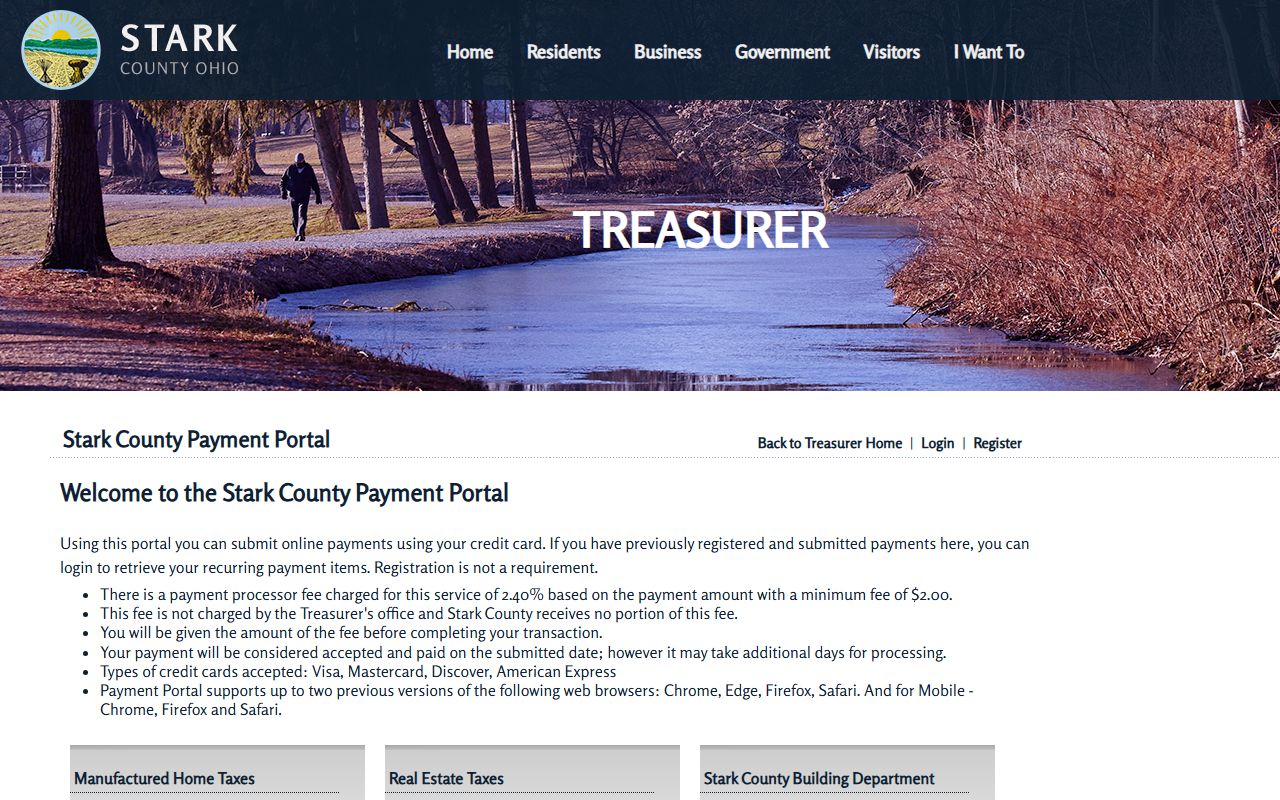
The portal accepts Visa, Mastercard, Discover, and American Express. No registration is required to pay. A processor fee applies to every transaction, so add that to the amount you owe before you confirm. Supported browsers include Chrome, Edge, Firefox, and Safari. Categories on the portal go beyond court costs and include real estate taxes, the health department, and the sanitary engineer.
How to Request a Certified Copy
Certified copies are the version courts, employers, licensing boards, and government agencies accept as proof of a record. A plain copy from a portal printout or a photograph of a docket screen is not the same thing. For any legal purpose, you need the Clerk's stamp and signature on the document. The steps below work for in-person, mail, and email requests.
- Identify the court and division. Decide whether your case is in the Common Pleas General Division, Domestic Relations and Family Division, or Appellate Division. Probate and municipal cases go to different offices.
- Gather the case number and party names. The case number gives the cleanest match. If you do not have one, provide every spelling of the party names, including maiden names or aliases used in the case.
- State whether you want a plain copy or a certified copy. Certified copies cost more. Tell the Clerk upfront which you need so the office can quote the right fee and prepare the right product.
- Ask about the fee and accepted payment methods. Copy and certification fees can change. Confirm the current amount before you send a check or make an online payment. The Clerk accepts payment at the counter and through the county payment portal for certain charges.
- Choose pickup, mail, or email delivery. In-person pickup is the fastest option. Mail requests require a self-addressed stamped envelope or prepaid postage. Ask the Clerk whether email delivery of scanned copies is available for your document type.
- Pay before mailed or certified copies go out. The Clerk does not ship documents before payment clears. For mail requests, include a check or money order made out to the Stark County Clerk of Courts, or confirm an online payment option for your specific request.
Note: Do not include Social Security numbers, financial account numbers, or medical detail in any email request to the Clerk.
Records Request Form Fields
When you submit a request, whether in person, by mail, or by email, the Clerk needs specific information to locate the file and fill the order correctly. Vague requests slow the process and can result in the wrong document. A complete request names the document, not just the case. The table below shows what to include and why each field matters.
| Field | Required | Notes |
|---|---|---|
| Case Number | Strongly recommended | Gives the cleanest match; prefix signals division (CR, CV, DR) |
| Party Names | Yes | Include every spelling used in the case, maiden names, and aliases |
| Division | Yes | General, Domestic Relations/Family, Appellate, or specify municipal/probate |
| Document Identified | Yes | Name the specific document (judgment entry, indictment, final decree), not just the case |
| Copy Type | Yes | Plain copy or certified copy; certified costs more and requires the Clerk's seal |
| Delivery Method | Yes | Counter pickup, mail (include SASE or prepaid postage), or email if available |
| Contact Information | Yes | Name, phone, return address, or email so the Clerk can follow up if needed |
The Clerk's public records policy sets the framework for response times and costs. Read it before submitting a large or complex request so you know what to expect.
Stark County Clerk Fee Schedule
Fees at the Clerk of Courts office vary by service type. Some charges are set by Ohio statute, and others are set by the Clerk's public records policy or by the county payment portal operator. The table below lists every verified fee. Plain and certified copy rates are not published on the public clerk page, so confirm the current amount by calling 330-451-7801 or emailing Clerk@starkcountyohio.gov before your request.
| Item | Amount |
|---|---|
| Payment portal processor fee | 2.40% of the payment, minimum $2.00 |
| eFiling filing fee | Due by credit card or e-check at time of filing; amount varies by case type |
| Naturalization search | Free public search online |
| Plain copies | Confirm current cost with the Clerk of Courts |
| Certified copies | Confirm current cost with the Clerk of Courts |
eFiling refunds are not made in cash. The eFlex system requires the filing fee at the time of submission by credit card or e-check, and the policy states that refunds follow their own separate process. If you initiate a case, file a petition, or submit a post-judgment filing through eFlex, the fee is due before the system accepts the document.
eFiling Through the Stark County eFlex System
Attorneys and self-represented parties can file documents electronically through the eFlex platform at efilingtraining.starkcountyohio.gov. You must request an account before you can submit anything. The login screen uses a User Name and Password, and new users can register directly on the eFlex site. The site also links an eFiling Manual, terms of use, a privacy policy, and a payment policy. All of those documents are worth reading before your first submission.
The terms of use say that logging in and submitting a document counts as your signature. Your user ID cannot be transferred to another person. Case summary information is visible to other account holders unless the court has placed a security restriction on the file. For most routine civil and criminal filings, case summaries are open to any logged-in eFlex user.
Case initiations, petitions, and post-judgment filings all require the filing fee at the time of submission. Pay by credit card or e-check. The eFlex system will not accept the document until payment is confirmed. The platform is operated by Tybera Development Group under a contract with the county.
Important: eFiling through eFlex is separate from the county payment portal. Use eFlex for case documents and the payment portal for court costs, fines, and other financial obligations after a judgment is entered.
Stark County Naturalization Search
The Clerk of Courts maintains a naturalization archive from the Common Pleas Court. These records document individuals who became United States citizens through the Stark County court system. The archive reflects docket entries and journals required by Ohio law and is kept by the Stark County Clerk of Common Pleas Court. For genealogy researchers, immigration historians, and individuals tracing family citizenship history, the online tool is a free starting point.
The search portal is at scwebnet.starkcountyohio.gov/Clerk_NatSearch/. The screenshot below shows the search interface from that page.
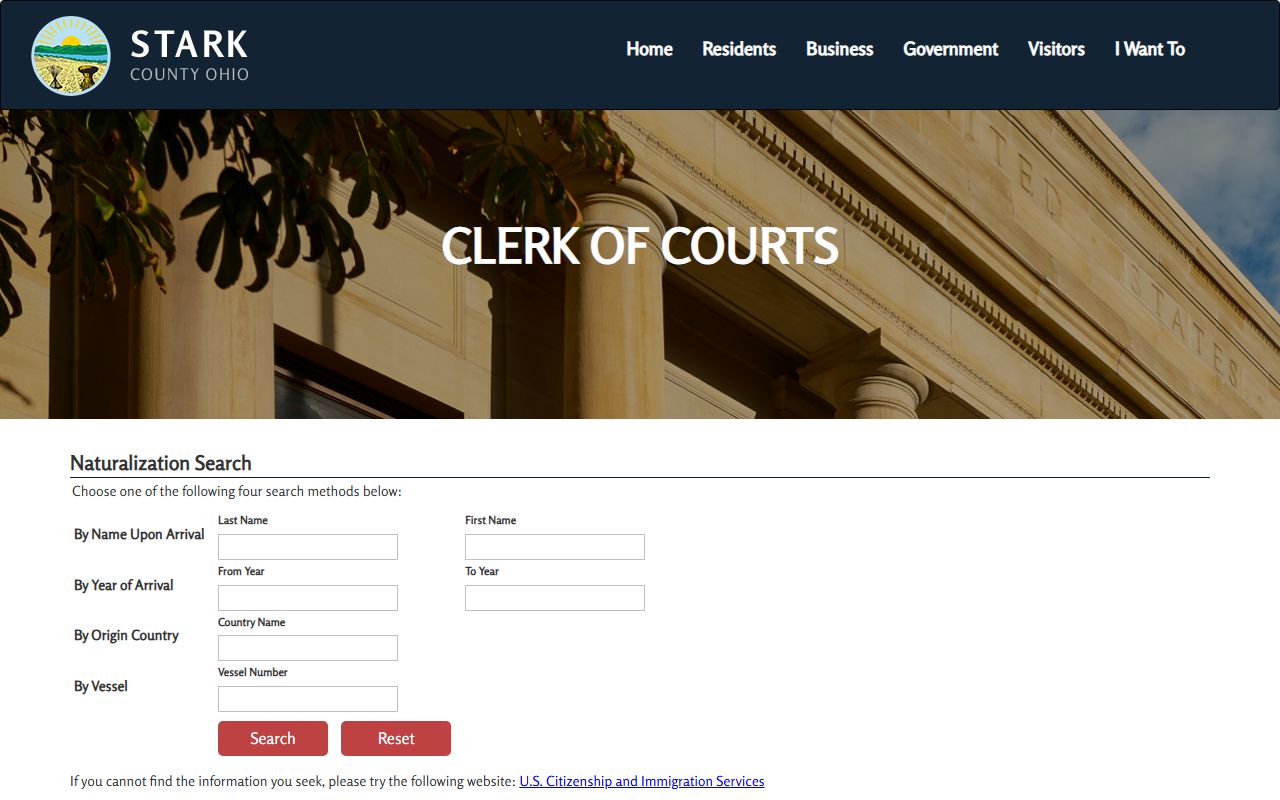
The naturalization search is a free public tool. If a search turns up a result, the official case file is at the Legal Division, 115 Central Plaza North, Suite 101. You would need to contact the Clerk to get a certified copy of the original naturalization file for legal or immigration purposes. The online tool shows docket data only; it does not deliver the underlying documents.
| Field | Type | Required | Notes |
|---|---|---|---|
| Last Name | Text | Optional | Name upon arrival in the United States |
| First Name | Text | Optional | Name upon arrival in the United States |
| From Year | Year | Optional | Year of arrival; use to narrow a date range |
| To Year | Year | Optional | Year of arrival; pair with From Year for a range search |
| Country Name | Text | Optional | Country of origin |
| Vessel Number | Text | Optional | Search by vessel if the ship name or number is known |
Note: All naturalization search fields are optional, but entering at least a last name or a year range gives more focused results than running a blank search.
Clerk Request Best Practices
A clear request gets a faster response. The Clerk handles a high volume of mail and counter visits every day. Staff spend less time on requests that arrive with everything they need and more time on requests that are vague or missing key details. A few habits make any request go smoothly.
Always give the full case number. A name search takes longer because the Clerk must find every case matching that name and confirm which one you want. If you have the number, lead with it. Include every spelling of party names even if you also give the case number, because amended filings sometimes list names differently than the original petition. State the division clearly. Common Pleas General, Domestic Relations and Family, Appellate, and the three municipal courts are all separate record sets. Asking for a Common Pleas record when you need a Canton Municipal record wastes time for both sides.
- Provide the full case number when you have it.
- List every name spelling, including maiden names and aliases.
- Name the division: Common Pleas General, Domestic Relations/Family, Appellate, or specify Canton, Massillon, or Alliance Municipal.
- Identify the document, not just the case. Ask for the judgment entry or the indictment, not "my case paperwork."
- Specify plain copy or certified copy and ask about the fee before you pay.
- Do not include Social Security numbers, financial account numbers, or medical details in email requests.
For the full case history and docket entries, see the court dockets page, which covers how to read the event log on any Common Pleas case.